
Main menu
You are here
Running models : diagnostic dialogues
Running models: diagnostic dialogues
The point at which you attempt to run a newly built model is where you are most likely to encounter failures due to incompleteness or inconsistencies in the model's definition. You should not give up at this point; a bit of attention to the messages will enable the problems to be fixed.
The first dialogue that appears will have an outline description of the problem, and only two buttons. Depending on the nature of the problem, these can be:
- OK / More info...
The problem has stopped whatever task was in progress from being completed. You can hit "OK" to go back and try again, or "More info..." to see a more detailed message, and get a reference to these help pages where appropriate.
- Give up / See all...
The task in progress can continue, although it will not be successfully concluded. You can hit "Give up", fix the indicated problem and try again, or "See all..." to keep running the task and display a list of all the problems found at the end.
- Default option / More options...
There are several possible actions that can be taken at this point. The most frequently chosen is named on the left button, while the right button opens another dialogue displaying all the options.
Errors during model building
These are problems that come up during the process of converting the Simile model to code that can run on the computer. There are many possible causes, the simplest being that not all components have their values specified (i.e., they are still red). Other building errors can arise if a component has been specified correctly, but its specification does not make sense in its context in the model, often because the context was changed after the component was edited. Several of these messages include useful information to help fix the problem, for instance:
Problem building code, e.g., Simile failed to convert var1 (in submodel submodel1) into a program instruction.
Something like this means that the component has an equation, but it no longer fits the component's place in the model. If you hit 'More info', then 'See full error text', you will see the error you would get if you tried to enter the same equation for the component now (or else you can just do so!). For instance, the parameter names that can be used in the equation might have changed, or a submodel index might no longer be valid.
Problem with model design, e.g., This model cannot be executed because it contains the following circular set(s) of function evaluations: [var1,increment(var2_sum),var2_sum,var2,made_for(var1,var2,1)]
Here, no one component is wrong, but the model cannot be built because together they do not make sense. In this case, a set of influence arrows form a circle, so there is no sensible order in which to evaluate the components they join together (see rules for using influences). The error message includes a list of all the components that form the circular chain, plus other entries representing intermediate steps performed by Simile in evaluating components.
Problem during compilation of model code
Simile has managed to convert the model into executable code, but the compiler (a separate program that turns c++ code into binary instructions) is having none of it. This usually means that there is a bug in Simile which is causing it to generate incorrect c++ code. The only thing you can do is file a bug report including your model code to Simulistics. However a compilation error is also triggered by an explicit division by zero, since the compiler will not build binary code that inevitably gives bad results. In that case you can rebuild your model using the 'debug' menu entry to find the location of the division-by-zero expressed in terms of model components (i.e., which component, in which submodel).
Problems linking model with parameters or visualization tools
These can occur either when a new helper setup or parameter file is loaded while a model is running, or if a model is changed and rerun while keeping the same helper setup or parameters. It means the component names listed in the file no longer exactly match the components in the model.
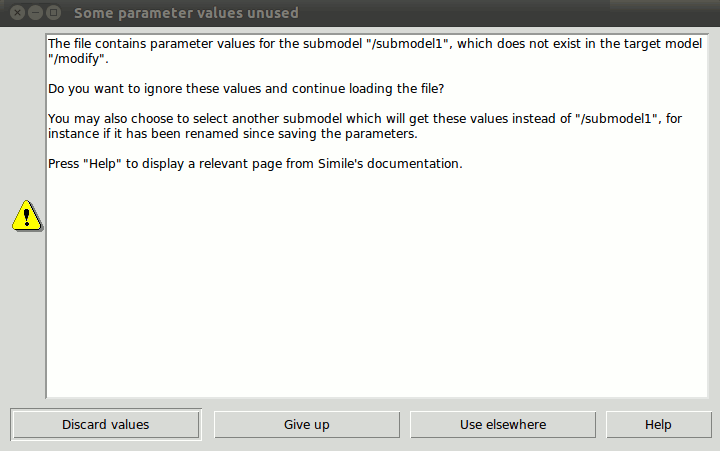
For example, the above is the "Some parameter values unused" dialogue. If a parameter metafile contains parameterization information relating to components that do not exist in the model you are trying to run, you have four options: Discard values (the default: ignore values for the missing component and keep loading the rest of the data), Give up, Use elsewhere (find a model component with a different name that can take the values for the missing one) or see help. The initial dialogue offers only the "Discard values" option and "More options...". Choosing the latter brings up the dialogue displayed above.
The Use elsewhere button is useful in the case where you have changed the name of a model component or a submodel containing it, or added or deleted a submodel boundary around it, since saving the parameter metafile. In the case above, the dialogue is pointing out that some parameters are for a component in a submodel that no longer exists in the model. In this case, hitting Use Elsewhere will bring up a tree diagram showing all the submodel captions in your model, and their nesting relation. When you select a submodel from this list, Simile will try to find the components from the lost submodel in that submodel instead, and supply the parameter data to them. If this works, you should re-save the parameter metafile later to avoid having to do the same thing again next time you open the model.
Problems during model execution
e.g., "Simile ran into a problem trying to run this model.
While calculating the value of {external procedure} during execution of the model at time 1275.0, there was an OS signal: 11 (SIGSEGV)."
These messages relate to problems in a model's logic that only become apparent when the model is running. These occur because some of Simile's advanced features require that the modeller stick to certain rules when using them, or else something undefined will happen in the model. The most commonly used such features are:
- The element() function. The second argument can be an expression, but it must always evaluate to a number between 1 and the number of elements in the array that is the first argument, otherwise it will attempt to get a value that does not exist.
- Dashed influences. These allow a model containing a circle of influences to be executed, specifying that the component at the head of the dashed influence can be evaluated without waiting for the one at the tail. But its equation should contain something like an 'if' clause to insert a boundary condition in any case where the tail does not already have a value anyway.
- Base instance lookup. While Simile will not allow a base instance lookup if the index is out of range, it is possible to cause other problems with this feature, for instance by looking up multiple base instances in the wrong order, e.g., any(index(1) is [10, 5, 1]).
When an error like this occurs, the model cannot continue to run. If it happens during reset or initialization, the execution LED goes grey and the model must be rebuilt before it will run again. If it happens during execution, the LED goes red and the model can be reset and run again. However, in either case, if the same problem occurs again, Simile will crash.
To get more information about the cause of these bugs, run the model using the 'debug' menu entry. This causes the model to be built and run in a scripting language, where attempts to access undefined values will produce a list of procedure calls from which Simile can deduce what actually was missing in the model. Here's an example:
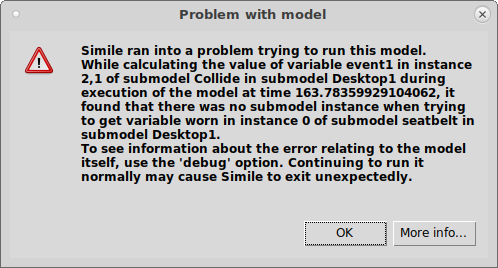
Here we can see the name of the variable in whose equation the error occurred (event1), the name and indices of the submodel instance containing it (Collide) and so on up to the desktop, and the identity of the missing quantity (the variable "worn") and why it failed (it was looking for the value from the instance of its parent submodel "seatbelt" with index 0 -- the index of the first element is 1). The message about using the debug option is irrelevant -- to get this level of detail, the modeller must already be using it. There are similar messages if the variable itself is missing, for instance due to unprotected use of the dashed influence, or a bad index for an array variable.
In: Help >> Running models
- Printer-friendly version
- Log in or register to post comments